Biometric vs Card Access Control Which Is Better?

Time:2026-11-26 Author:Isabella
0%

Choosing an access control system is not just a question of replacing keys. It affects daily entry, visitor handling, security oversight, and the workload placed on staff. A card reader is familiar: an employee taps a badge, and the door opens. A biometric reader may use a fingerprint or facial match, reducing reliance on a badge that can be lost or shared. Neither option is automatically safer in every building.

Industry reports offer useful context, but not a simple winner. Verizon’s 2024 Data Breach Investigations Report identified credential abuse as a leading initial access method, accounting for 24% of cases. That finding concerns digital breaches, not physical door readers, so it should not be treated as a direct comparison. IBM’s 2024 Cost of a Data Breach Report estimated the global average breach cost at $4.88 million, underscoring the value of careful security planning. Still, a costly problem does not make one technology right for every site.

The practical question is how to choose between biometric and card-based access for your people, premises, and operating conditions. Consider entry volume, shared access needs, privacy expectations, accessibility, support costs, and what happens during a power or network outage. A busy laboratory, a small office, and a public-facing facility may need different safeguards. There is no perfect door. Even a well-designed system can create friction if badges are forgotten or readers reject valid users. This guide compares the trade-offs, highlights questions worth asking vendors, and helps you match the control to the real risk—not just the newest feature.
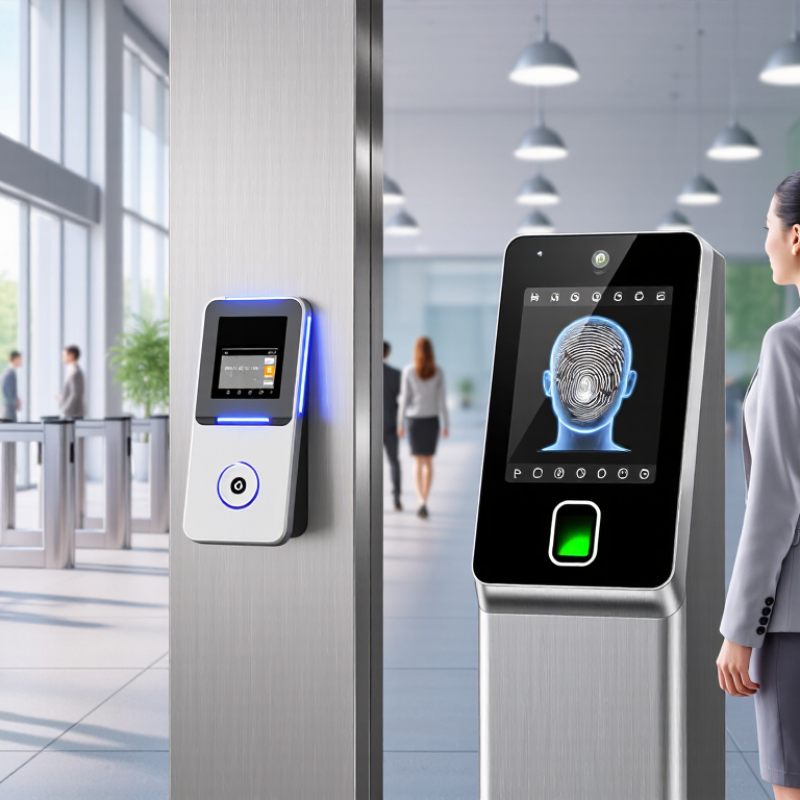
Biometric vs Card Access Control Which Is Better?

How Biometric and Card Access Control Systems Identify Users

Biometric vs Card Access Control: Which Is Better?

A card reader identifies a credential, not the person holding it. The reader checks a card number against an access list, then grants or denies entry. This is fast and familiar; a badge tap at a lobby turnstile takes only seconds. But cards can be misplaced, loaned, or left in a drawer. That gap matters.

Biometric systems compare a live face, fingerprint, or other trait with an enrolled template. The match links access more closely to the person, though enrollment quality, lighting, sensor condition, and changes in appearance can affect results. NIST’s 2019 Face Recognition Vendor Test demographic-effects report found that many tested algorithms showed false-positive-rate differences of 10 to 100 times across demographic groups in some comparisons. Those results are not a verdict on every current system, but they make independent testing and careful deployment essential. A fingerprint reader with a wet sensor may frustrate staff. Small detail, real consequence.

The choice depends on what the site needs to verify. Cards are easier to issue and replace, while biometrics can reduce reliance on a carried credential. Some facilities use both, especially where stronger identity checks justify extra setup and support. Biometric data also needs thoughtful protection and clear retention practices. Convenient, but not magic. A practical evaluation should test real entry conditions, including gloves, glare, visitor traffic, and fallback procedures.

How Each System Grants and Records Access

Biometric and card systems can open the same door, but they create different access records. A biometric reader checks a physical trait, such as a fingerprint, against an enrolled template. If the match meets its settings, the controller grants entry and records details like the reader, time, and result. Some systems also log a confidence score or failed attempts. A card reader checks a credential instead. The controller confirms that the card is active and permitted at that door, then logs its identifier and the access decision.

That distinction matters. A card log shows which credential was presented, not necessarily who held it. Cards can be lent, misplaced, or left in a coat pocket. A biometric event is more closely tied to an enrolled person, but it is not infallible. Wet fingers, worn sensors, or poor enrollment can cause failed matches. Neither record, by itself, explains why someone entered. Not always. For a useful audit trail, administrators need clear timestamps, door names, access outcomes, and a process for reviewing exceptions. They should also test how outages are recorded and who can view or retain the logs. I would not assume that a detailed log automatically means a reliable one. A tailgating event, for instance, may leave no second entry record at all.

Biometric vs Card Access Control: Which Is Better? — How Each System Grants and Records Access

Comparison dimension Biometric access control Card access control
How access is granted A reader captures a biometric characteristic, such as a fingerprint or facial image, and compares it with an enrolled template. Access is granted when the match meets the system’s configured threshold and the user is authorized. A reader detects a card credential, usually through contactless radio-frequency communication or a physical contact interface, and checks whether its identifier or cryptographic credential is authorized.
What identifies the user A physical or behavioral characteristic is used to verify or identify a person. Depending on configuration, the biometric may be compared with a claimed identity or searched against enrolled users. A card or token represents a credential assigned to a user. The reader verifies the credential; possession of the card alone does not prove who is holding it.
Typical access sequence The person presents the biometric, the reader captures it, the system performs a match, and the access decision is sent to the door controller. The person presents or taps the card, the reader reads its credential, and the system checks permissions before sending the access decision to the door controller.
What an event log can record Common records include the enrolled user or credential reference, reader or door, date and time, and grant or denial result. Some systems may also record diagnostic or match-related details. Logs do not necessarily contain a biometric image. Common records include the card or credential reference, reader or door, date and time, and grant or denial result. The system can generally associate the credential with its assigned account.
Sharing and transfer A biometric trait is tied to the enrolled person and is harder to hand to another person than a card. However, biometric matching is not infallible, and presentation attacks or enrollment mistakes remain possible. A card can be lent, borrowed, or used by someone other than its assigned holder. Procedures such as photo checks, turnstiles, or an additional authentication factor can help address this limitation.
Lost or compromised credential A compromised biometric cannot be replaced in the same way as a lost card. Systems should support secure template handling, revocation of enrollment, and an alternative access method. A lost card can usually be disabled and replaced. Prompt reporting and revocation are important because an active lost card may still be used by whoever has it.
Privacy and data handling Biometric data is sensitive personal information in many jurisdictions. Organizations should assess applicable privacy requirements, limit collection and retention, protect templates, and clearly explain how data is used. Card systems still process access and movement records linked to users. They generally do not need to collect a person’s biometric, but access-log privacy and retention still require appropriate controls.
Factors affecting reliability Performance can be affected by sensor quality, placement, lighting for some modalities, environmental conditions, changes in the user’s characteristic, and the system’s matching threshold. Performance can be affected by damaged or unreadable cards, reader condition, credential technology, interference, and whether the card is presented correctly.
Issuing and day-to-day administration Users must be enrolled, and enrollment quality matters. The organization also needs processes for failed matches, accessibility needs, re-enrollment, and alternative credentials. Cards must be issued, assigned, tracked, and returned or disabled when no longer needed. Replacements are generally straightforward, though card stock and administration add ongoing tasks.
Common strengths Can reduce reliance on a carried credential and make it harder to casually pass an access credential to another person. Useful where stronger identity assurance is needed and privacy requirements can be met. Familiar and practical for many sites; credentials are easy to issue, revoke, and replace. Cards can also be combined with a PIN or biometric as part of multi-factor access.
Common limitations Requires careful privacy, security, enrollment, and exception-handling practices. A biometric match should not be treated as perfect identity proof, and some users may be unable to use a particular modality reliably. A card proves that a credential was presented, not necessarily that its assigned user presented it. Cards can be lost, shared, copied, or misused depending on the credential technology and controls.
Best-fit considerations Consider when reducing credential sharing is a priority, users can be enrolled reliably, and the organization can securely manage biometric data and provide an accessible fallback. Consider when simple credential issuance and replacement are priorities, users can carry cards, and the organization has effective controls for lost cards and credential sharing.

Practical takeaway: Neither method is universally better. The right choice depends on the required identity assurance, privacy obligations, operating environment, user needs, and the quality of the system’s credential, reader, and logging controls.

Differences in Security, Privacy, and Reliability

Biometric vs Card Access Control: Which Is Better?

Differences in Security, Privacy, and Reliability

Biometric and card systems solve different problems. A card is a familiar, replaceable credential: if it goes missing, an administrator can deactivate it. But cards can be borrowed, lost, or damaged. Biometrics connect access to a person, reducing casual credential sharing. They can still fail in everyday conditions. A wet finger, poor camera angle, or changing light may delay entry. Neither option is automatically more secure; reader quality, enrollment practices, and backup procedures matter.

Privacy deserves equal attention. A card can reveal when someone entered, while biometric systems may store sensitive templates that cannot be replaced like a card. NIST’s 2019 Face Recognition Vendor Test evaluated 189 algorithms using 18.27 million images from 8.49 million people. Its findings showed that false-positive differences varied by algorithm and demographic group. This is a useful warning: test systems with the actual users and conditions they will serve. A promising lab result is not a guarantee at a busy doorway.

Tips: Use cards where easy replacement and simple administration matter. Consider biometrics where stronger person-to-credential matching is needed, but ask how templates are protected and deleted. Test with wet hands, low light, gloves, and peak-time queues. Keep a secure fallback; real buildings are messier than demos.

Costs and Practical Requirements of Each Method

The better choice depends on door traffic, staffing, and how much upkeep the site can absorb. Card systems often cost less to deploy: readers are straightforward, and staff can carry slim cards or badges. Budget for replacements, though; badges get lost, damaged, or left beside a workstation. That happens. Busy facilities may need spare cards and a clear process for disabling missing ones. Biometric access can reduce card handling, but readers and enrollment require more setup. Fingerprints may be harder to read when hands are wet or dirty. Keep a backup method.

Compare full operating costs, not just the reader price. Include installation, system integration, enrollment, maintenance, and staff time for access changes. Biometric systems may require careful sensor placement, secure handling of biometric data, and periodic testing. Card systems need inventory and prompt cancellation procedures. Ask who can access stored data, how long it is retained, and what happens during a network outage. These details vary by system. I would not assume biometrics are automatically safer; setup and fallback procedures matter. A small office may find cards easier to administer, while a busy entry could benefit from hands-free checks. Still, false rejections can cause queues, and misplaced cards can trigger avoidable support calls. Pilot one entrance before expanding.

Biometric vs. Card Access Control: Which Is Better?

Illustrative cost comparison for one secured door and 100 users (USD).

How to read this: Initial cost estimates include reader, installation, and user credential setup; annual costs estimate software and routine maintenance. In this example, cards cost less initially and annually, while biometrics avoid issuing physical credentials.

These are illustrative planning estimates, not a market survey or quote. Actual costs vary with equipment, installation, software, security requirements, and local labor. Cards are easy to issue and replace; biometrics require enrollment and careful handling of privacy and accessibility requirements.

Factors to Consider When Selecting an Access Control System

Choosing between biometric and card access starts with the doors, users, and daily routines—not a feature list. Cards are quick to issue and replace, and work well where many people need predictable entry. Biometrics can reduce card sharing, but readers may struggle with wet hands, gloves, dust, or changing light. At a busy loading entrance, that small delay can create a queue. Neither option is automatically more secure; configuration and supervision matter.

Check total operating effort. Card systems need replacement stock and clear rules for lost credentials. Biometric systems require careful enrollment, secure template handling, and a fallback for people whose scans fail. Ask how access works during network or power interruptions, who can change permissions, and how entry logs are reviewed. Consider privacy expectations and accessibility in the actual workplace. A pilot at one entrance often reveals issues a brochure misses. It may not settle every question, either.

Tips: Test both options during peak shift changes. Time entry, check failure handling, and ask users what feels awkward. Keep an alternative credential available, and review access lists regularly. The simplest setup may be better—but only if it fits the people using it.

FAQS

What information does a card access log record?

It usually records the card identifier, door, time, and access decision. It does not prove who held the card.

How does biometric access create a record?

A reader compares a physical trait with an enrolled template. It may log the door, time, result, and sometimes failed attempts or a confidence score.

Are biometric systems always more secure than cards?

No. Biometrics can reduce casual card sharing, but wet fingers or worn sensors can cause failed matches. Setup matters.

What privacy issues should administrators consider?

Biometric templates are sensitive and cannot be replaced like lost cards. Ask how templates are protected, stored, and deleted.

What can make a biometric reader less reliable?

Gloves, dust, poor camera angles, low light, or wet hands may slow entry. Queues can form.

How can a building maintain access during failures?

Keep a secure fallback credential and ask what happens during power or network interruptions. Test the process, not just the reader.

What makes an access log useful for an audit?

Clear timestamps, door names, and access outcomes help. Review exceptions and limit who can view or retain records.

Can access logs explain every entry?

No. A card may be borrowed, and tailgating may create no second record. A detailed log is not always a reliable one.

How should a workplace compare access options?

Pilot both at a real entrance, especially during shift changes. Time entry and ask users what feels awkward. The test may not answer everything.

Conclusion

Biometric and card-based access control systems identify users in different ways. Biometric systems verify a physical characteristic, such as a fingerprint or facial pattern, while card systems rely on a presented credential linked to a user account. After identification, each system checks the user’s permissions, unlocks an approved entry point, and records relevant access activity. Their security and reliability depend on factors such as accurate recognition, credential handling, equipment condition, and backup procedures. Biometrics can reduce the risk of a lost or shared credential, but they raise privacy considerations and may be affected by changes in conditions. Cards are familiar and easy to replace, yet they can be misplaced or passed to others.

Costs and practical requirements also differ. Biometric systems may require specialized readers and careful handling of personal data, while card systems need credentials, readers, and a process for managing replacements. When considering how to choose between biometric and card-based access, assess the sensitivity of the area, user convenience, privacy expectations, reliability needs, installation and maintenance costs, and the organization’s ability to manage the system over time.

Isabella

Isabella

Isabella is a dedicated marketing professional with a sharp focus on driving brand growth and engagement through strategic content creation. With an extensive background in digital marketing, she combines her passion for storytelling with her keen understanding of industry trends to deliver......